Stage-specific SMS agents are only as reliable as the signal they run on. If the signal from your CRM is missing, delayed, or ambiguous — the wrong agent fires, or nothing fires at all, and the candidate hears silence at the moment they needed to hear something specific.
Before any franchise development team can trust stage-specific automation, the stack underneath it has to be ready. This is not a complicated project. But it is a checklist, and skipping items on it is exactly why most franchise automation breaks down in the middle of the funnel rather than at first contact.
The Core Requirement: One Stage Change, One Clean Signal
A stage-specific SMS agent does one thing on demand — it launches when a lead moves into its stage. The intro call agent fires when a new lead comes in. The application agent fires when the rep marks the candidate ready to apply. The FDD agent fires when the document is sent and the stage changes to reflect that. The Discovery Day agent fires when attendance is confirmed.
Each of those is a different conversation, a different set of questions the candidate will ask, and a different job for the agent. Running one script across all of them produces the same result as a form letter: technically present, completely useless.
For any of this to work, your CRM has to send one unambiguous signal per stage change. That means:
- Pipeline stages must be defined and named consistently, not ad hoc variations that different reps use differently
- The stage change itself — a rep dragging a card, clicking a status, or a form submission triggering a move — has to actually fire the signal out of the CRM
- The signal has to carry enough data: the lead's mobile number, consent status, and enough context for the right agent to pick up the right thread
If your CRM has these three things configured, the agent layer can sit on top of it and work. If any of the three is missing, the automation stalls in a way that is not visible until a candidate goes quiet and nobody knows why.
Why Stage Naming Is Not a Minor Detail
The most common failure point in franchisor automation stacks is not the integration — it is that the pipeline stages mean different things to different reps.
One rep uses "FDD Sent." Another uses "Disclosure Issued." A third skips the stage entirely and jumps straight to "Discovery Day Scheduled." From the CRM's perspective, those are three different events. From the agent's perspective, two of them fire the wrong trigger, and one fires nothing at all.
Stage naming has to be standardized before any agent is built on top of it. That means sitting down with the actual stage list in your CRM — not what the process document says, but what the dropdown currently contains — and making sure every stage that should trigger an agent maps to a single, agreed-upon name that every rep uses, every time.
This is also the moment to verify that the canonical franchise development sequence is being followed in the CRM itself. The correct order is: lead capture, intro call, application, FDD issuance, franchisee validation, Discovery Day, agreement execution, onboarding handoff. Application always comes before FDD issuance. Discovery Day is late-stage. If the CRM stages are out of order, the agents built on top of them will fire at the wrong moments — and that is a sales process problem, not a software problem.
The Webhook and API Side
Once the stages are clean, the next question is whether a stage change actually sends a signal out of the CRM.
Most franchise-focused CRMs — FranConnect, GHL, Salesforce, HubSpot, Zoho, ClientTether, and others — support webhooks or API events. A stage change can trigger a POST request that FranFunnel receives and routes to the right agent. But the webhook has to be configured. Many CRM setups have the stages right and the automation workflows in place, but no outbound webhook ever registered. The stage changes, nothing leaves the system, and FranFunnel never receives the signal.
The other failure mode is manual updates that bypass automation entirely. A rep updates the stage directly in a CRM list view, the workflow that fires on stage change is never triggered, and the agent sits idle. Fixing this usually means adding a required field or a workflow rule that fires regardless of how the rep changes the stage — not just through a Kanban drag.
"44% of franchise brands never sent a personal reply — just an automated acknowledgment, or nothing at all." — FranFunnel Franchise Lead Response Time Study · 530 brands · fielded March–April 2025
That gap exists partly because the follow-up infrastructure is not wired to actually send something. Fixing the webhook layer is the same fix applied earlier in the funnel.
Lead Data That the Agent Can Actually Use
An agent that fires on a valid signal but receives incomplete lead data produces a broken experience. The two things that have to be on the lead record before any stage fires an agent:
A mobile number. This sounds obvious, but franchise inquiry forms often collect email and sometimes phone, and the phone field is not always validated as a mobile number. If a lead submits a landline or a VOIP number and the CRM stage changes, FranFunnel can receive the trigger and have nowhere to send the text.
Consent. The lead's record has to reflect that the candidate agreed to receive text messages. This is not just a compliance requirement — it is what determines whether FranFunnel sends the message at all. The consent capture happens at the form level, and it has to be mapped to the CRM field FranFunnel reads. If that mapping is missing, the agent will fire and immediately stand down because the consent flag is absent.
Both of these are confirmed during the FranFunnel setup process. The integration build includes a data audit that checks what fields are populated on inbound leads and flags any gaps before the first agent goes live.
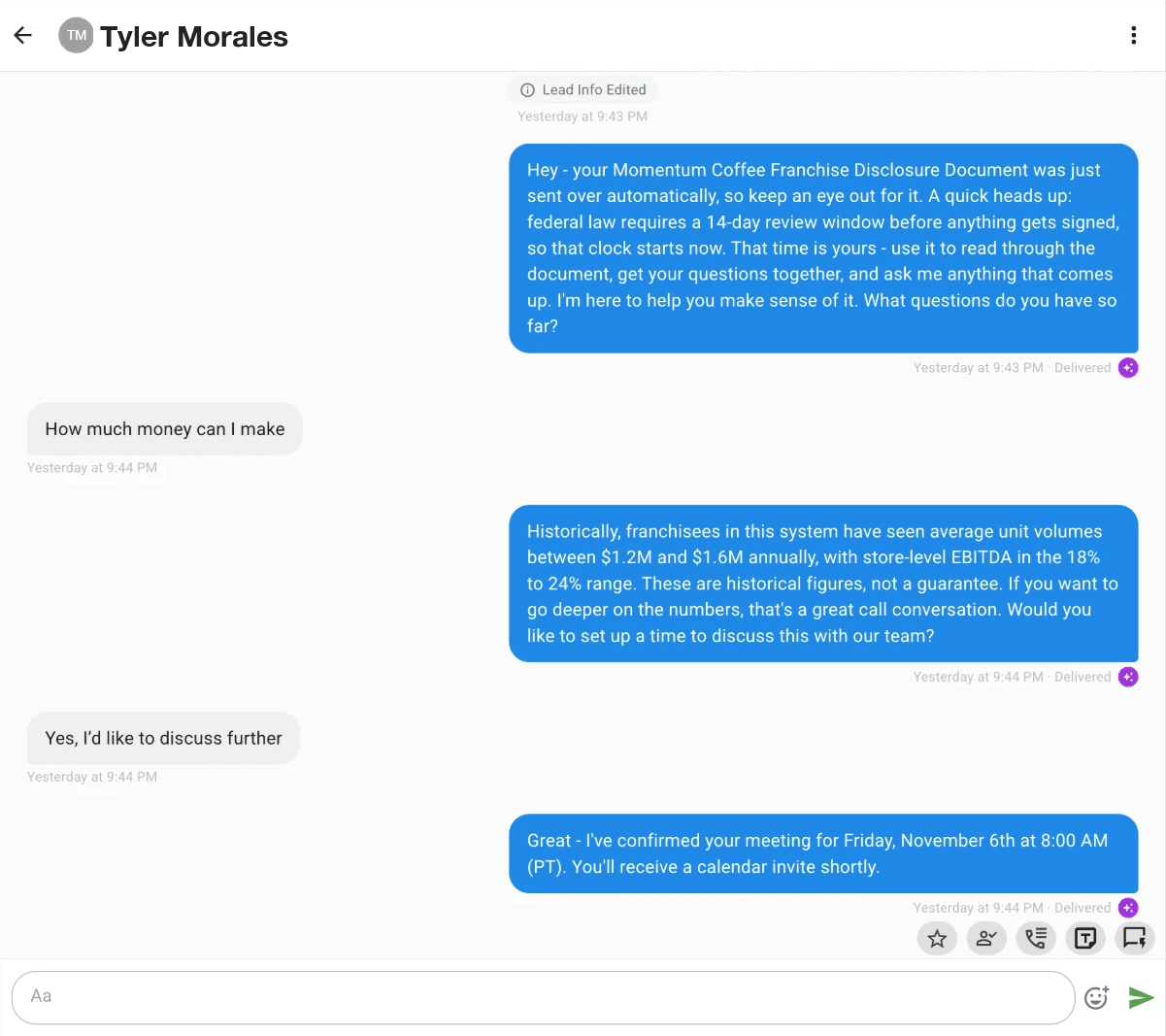 The FDD stage agent picks up the thread the moment the CRM stage changes to FDD Sent. Names changed.
What FranFunnel Builds on Top of a Ready Stack
Once the four prerequisites are confirmed — consistent stage naming, outbound webhook or API events, mobile number validation, and consent mapping — FranFunnel's setup team builds the agents:
| Pipeline stage | Agent job | Trigger |
|---|---|---|
| New lead / intro call | Engage, answer initial questions, offer calendar times in the thread, book the meeting | Lead created or stage moved to intro |
| Application | Follow up on the open application, answer next-step questions, keep the conversation alive | Stage moved to application |
| FDD issuance | Check in during the 14-day review window, answer FDD questions, send reminders | Stage moved to FDD sent |
| Discovery Day | Confirm attendance, answer travel and logistics questions, send reminders | Stage moved to Discovery Day confirmed |
Each agent is built by the FranFunnel team to match the engagement, questions, and follow-up that stage actually requires. A rep can step into any thread at any moment — the instant they send a manual message, the agent for that stage shuts off, and the rep is driving the conversation. The next agent activates when the CRM stage transitions to its trigger.
Setup is white-glove. You do not configure the agents, write the prompts, or manage the integration. You approve the stage map, and everything goes live from there — typically within 48 hours.
If the stack is ready, the agents work reliably. If it is not, the first thing the setup call does is get it there.
See how the stage agent setup works for your pipeline. Book a demo at franfunnel.com.